Analyst Tips
There are certain areas of Analyst which need some extra care when you are wanting to push medication through to HxCare. As Analyst allows you to configure medication dosage information and administration schedules in a number of ways, there are some best practise tips that will mean the information that gets pushed through to HxCare will be more consistent and more easily translatable to the view that the care home will see and then use to administer medication. By following these tips, it will reduce the number of medication queries you get from the care home and it will improve the efficiency of the Analyst & HxCare integration further.
Adding Custom Dose Information
Analyst will create a dosage instruction based on how you configure the medication in the user interface unless you override it with a customer dose. The best practise for sending the dosage information to HxCare is to add a Customer Dose to every medication. Take this example:
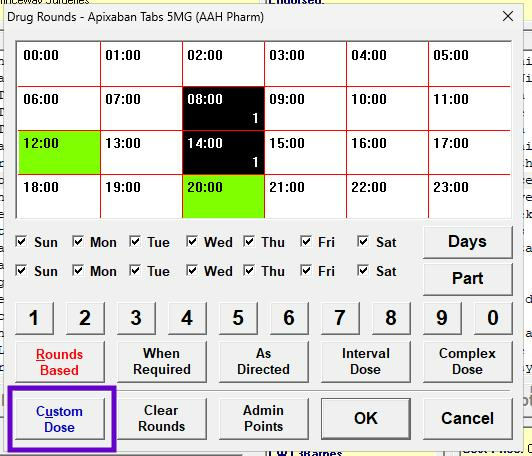
Analyst would create a dosage instruction of "Take one at 8am and one at 2pm" whereas you want to use "Take two tablets a day, one in the morning and one in the afternoon". Only by adding a Custom Dose can you make sure the correct information is sent across to the care home.
Variable doses
For medication that requires a variable dose, such as "10-20mls daily", this is not something you can set within Analyst. In order for this information to get through the care home you should enter a quantity of 0 in the appropriate rounds and use the custom dose to include the specifics of the dosage. This will then make sure the medication is presented to be taken in the appropriate round, and the dosage instructions that will sit along side that round information will give the person administering the medication the correct information.
If, when you do this, you need to set it as a round scheduled medication, but Analyst won't let you select the rounds, change the dosage type to a Complex Dose in order to select the correct round information.
Decimal Places
If a liquid medication needs a decimal place, such as 2.5mls, Analyst will not let you set that. In order to send this medication across to HxCare if it's Rounds Based you'll need to enter 0 as the quantity in the round and then use the Custom Dose to put the specific quantity information in such as "Two and a Half Mls to be taken at night".
Decimal places for tablet medication, such as 2.5 tablets, is something Analyst will let you set up.
Patches
This one is a little more complicated, but once you understand it it shouldn't be hard to follow.
Patches need to dispensed using 'Round Based' to ensure that a quantity can be added so the stock can be decremented correctly in HxCare. Most patches fall under the category of 'not in tray, which prevents you adding quantities. See the example below:
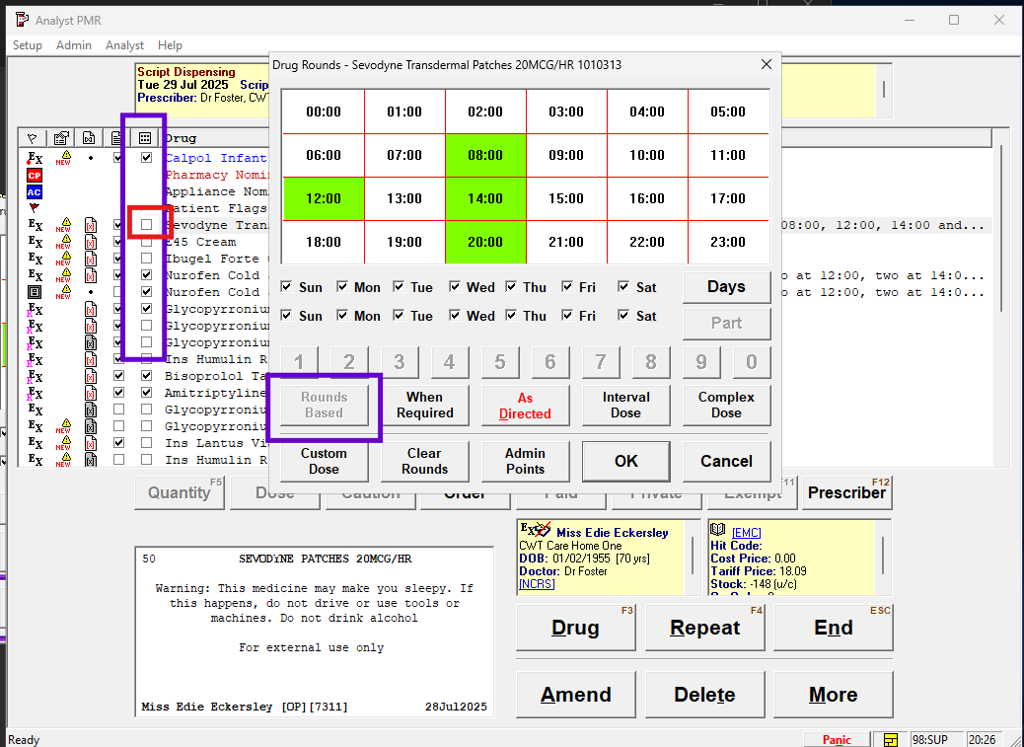
If you initially accept the information on the first screen, you can then change the checkbox for trays so it's it's ticked. Now, when you amend the medication, you'll be able to select a round and add the correct quantity to it as below:
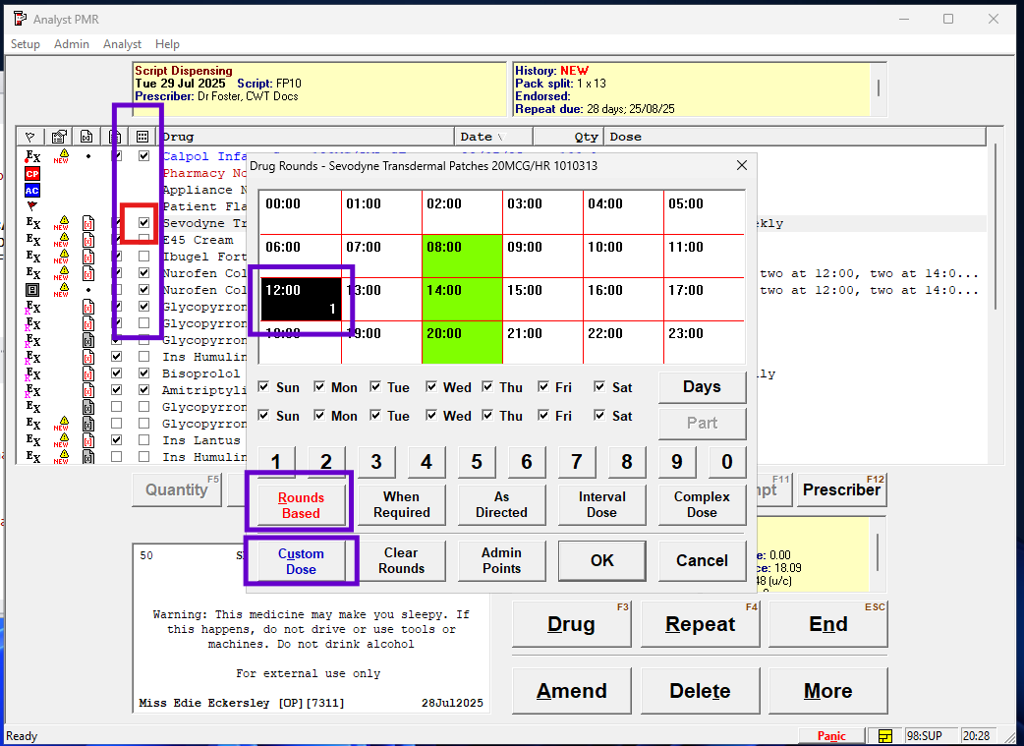
Now when you process this medication, the correct quantities will be sent to HxCare which will help the care home keep track of stock more efficiently.
Before Sending The MDS File
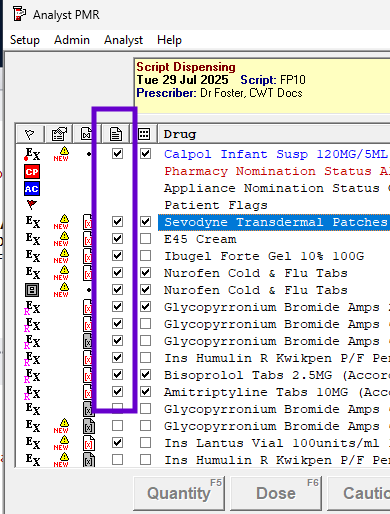
Before you do complete the process and send the MDS file across to HxCare, please make sure that all the items you want to send are ticked, as below:
Onboarding With HxCare
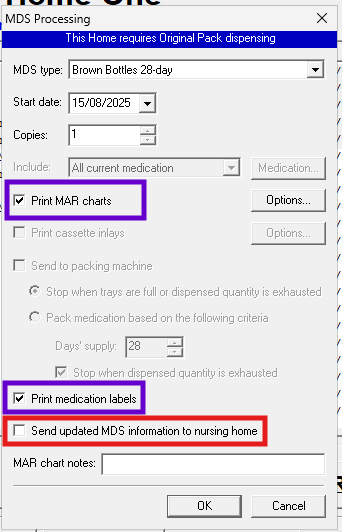
During the onboarding process with HxCare there some steps that need to be carried out in a specific order and coordinated with our team and the care home. One of these key steps is when you send the MDS file across to HxCare for the first time. As you are processing and labelling the medication for the first time, you need to make sure that the box to send the MDS file is unchecked, as below:
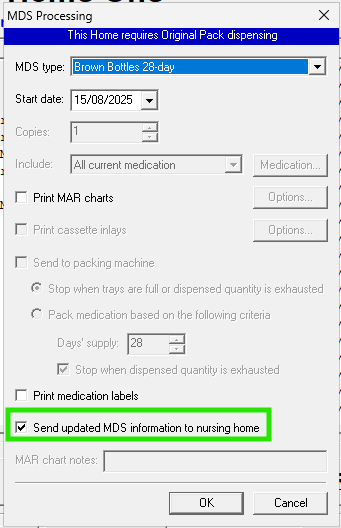
When the onboarding is complete, you can reset this, as below:
Using the 14 Day Schedule
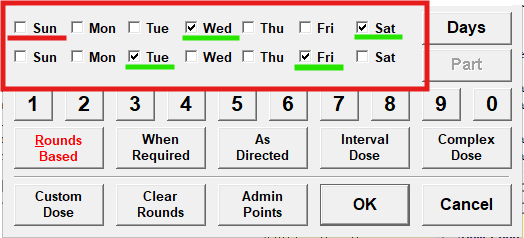
Some dosage patterns aren't as simple as 'every day' or 'every 2 days' and may not fit neatly into a 14 day period. An example of this is "every 3 days" or "every 72 hours". For these cases you will need to use the complete 14 day options, rather than just starting from the current day of the week or the start date of the medication.
For example: The medication is being processed today (27/08/25) but is due to start on Wednesday 03/09/25. This will ensure the system can generate a continuous schedule for the entire cycle.
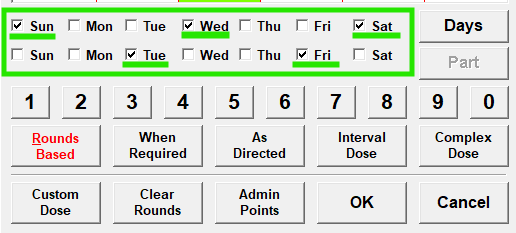
If the full schedule has not been completed for the appropriate complex dose, the system will not be able to generate the required pattern.