
Updating A Missed Medication Record
There may be times when an administration has been marked as Missed.
A medication will automatically get marked as Missed for two reasons:
- The time has gone passed midnight. Any meds that don't have an administration record for that day will be marked as missed as a nightly job.
- The next administration of that medication has happened. For instance, if you have a medication that requires one tablet in the morning and one table at night, if the morning tablet wasn't recorded, when you administer the night time tablet, the morning one will automatically be marked as missed.
If you need to correct this, you would click on the relevant cell that has the solid triangle in the top right:

You will then be taken to the administration screen where you will see all the details about the administration that should have taken place, the last recorded administration and you can then choose to log a successful administration or a non-administration:
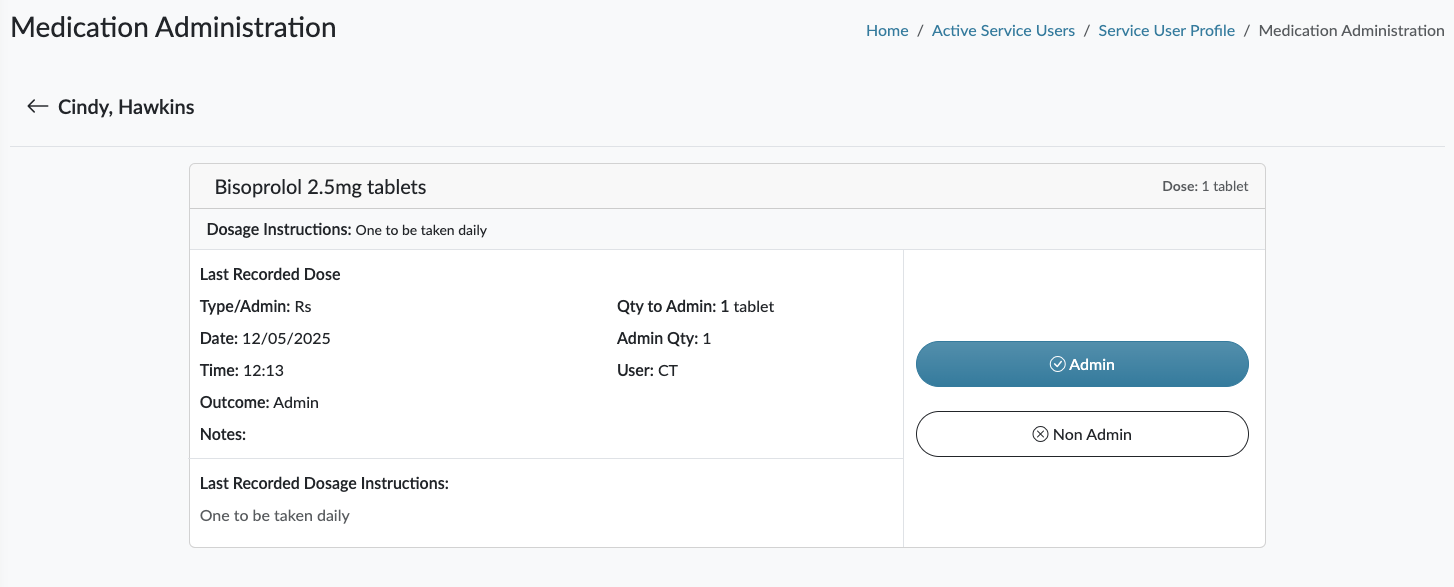
The important thing here is that you will see that the medication administration was logged at either the time you edited the missed medication, or you can update the time to say what time it did happen. The activity log captures when all these events happen and the date and time, so it would be clear to uncover any poor practice if it was to take place.