
Pharmacy Management
Your care home needs to order medication from a pharmacy via prescriptions from a GP for your service users, and you might work with a single pharmacy or a number of pharmacies. The pharmacies you work with will have their own access to HxCare and will be able to view the orders from all the care homes they work with that use HxCare.
In order to make sure the information that you and the pharmacy see, you will need to make sure that the pharmacy is linked correctly to your care home.
You will need to add and link a pharmacy to your care home before you can assign that pharmacy to a service user. Until a pharmacy is linked to a service user, you will not be able to order their medication through HxCare.
When you first set up your care home as part of the onboarding process, you will need to choose which pharmacy or pharmacies you want to link to. You will only be able to link to pharmacies that are set up with HxCare.
From the Settings > Pharmacies menu option, you will able to set which pharmacies you are linked to. When adding and linking to a pharmacy, the pharmacy itself will see that you have linked to it, so it’s a good idea to keep in touch with your pharmacy through this process and make sure they are happy with the link.
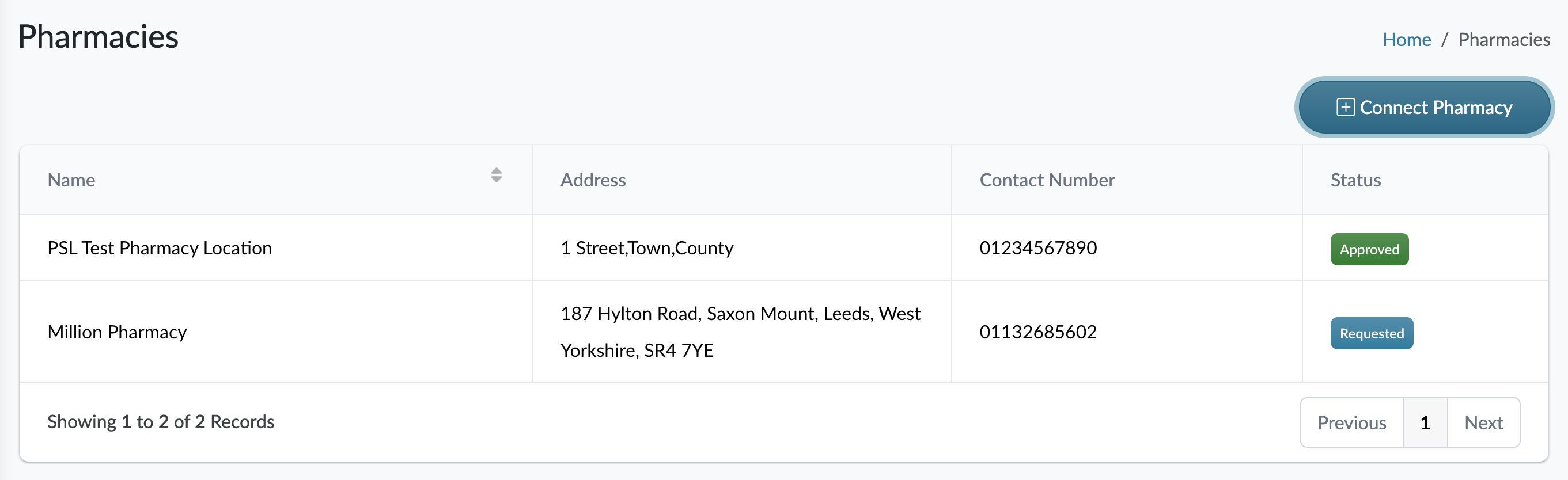
The pharmacy will also have to confirm your request to connect through the HxCare Pharmacy portal. This avoids any confusion with care homes linking to pharmacies without the pharmacy knowing about it. In the example above, you will only be able to link service users to PSL Test Pharmacy Location as the Million Pharmacy hasn't approved the connection yet.
The pharmacy won’t be able to remove your link, so if, for whatever reason you need to change pharmacy, you’ll need to add and link to the new pharmacy, move your service users over to the new pharmacy, then unlink your care home from the original pharmacy.
You will only be able to link your individual service users to the pharmacies that your care home are linked with, so make sure this step is done before onboarding service users to save time in the set up.